
Home / Platform / Construction Progress & Punch List Software
03 / CONSTRUCTION MANAGEMENT
Construction progress.
Punching. Close-out.
Connect construction progress, punch items and completion evidence with the physical context of the work.
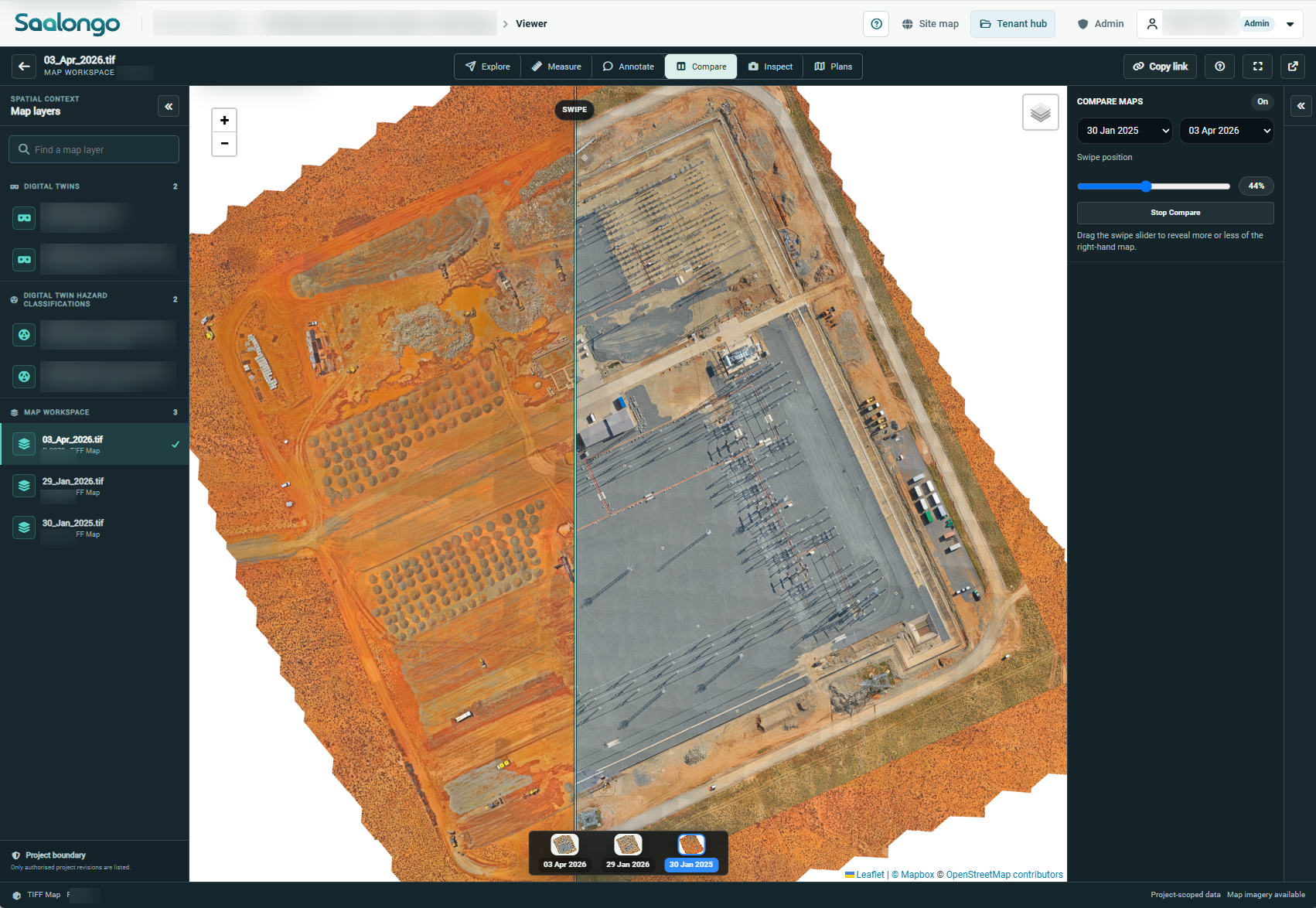
Actual Saalongo map comparison across two survey dates. Identifying details blurred. View full size.
A SHARED VIEW OF THE WORK
Make progress reviews
more concrete.
Teams need to understand what has changed, where work remains and what evidence supports completion. Saalongo brings captured site views and project records into the same conversation.
Progress in context
Review captured views of the work area alongside the project information that explains progress.

Punching with location
Connect punch items to the asset or work area so the issue can be understood.
Completion with evidence
Keep supporting records available when work is reviewed for close-out.
SAALONGO IN USE
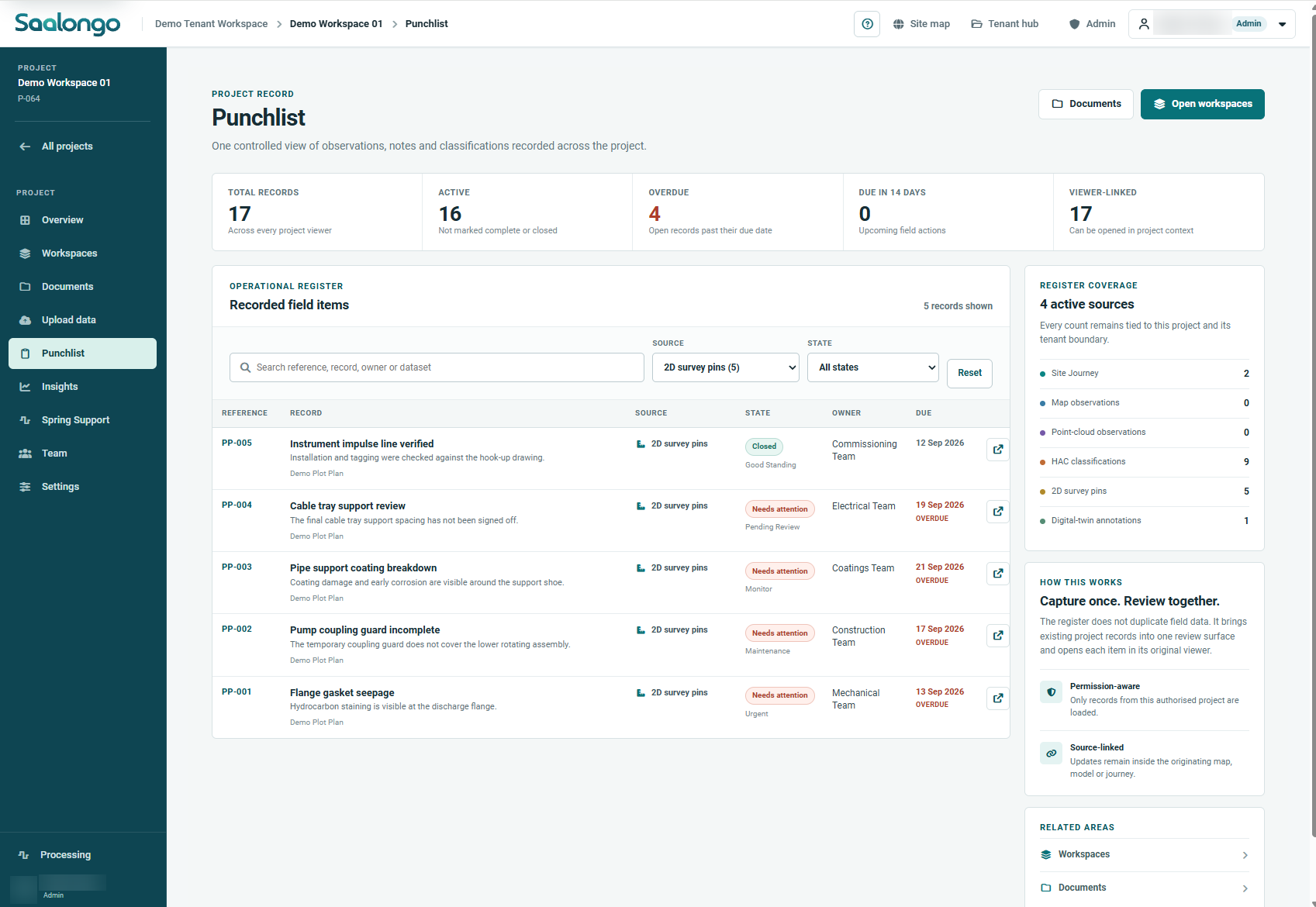
One register.
Outstanding work in view.
Review field items with their owners, status, due dates and links back to project context. This capture uses demonstration records.
CONNECT PROGRESS AND QUALITY
Build handover readiness
while the work happens.
A visual progress record becomes more valuable when it is connected with the quality evidence behind the work. Bring test records, QC packs and project documents into the same context.
01
Capture the work area
Use site imagery and spatial views suited to the construction activity.
02
Review progress
Use the shared visual record to discuss changes, completed work and remaining scope.
03
Record outstanding items
Locate punch items and connect the supporting evidence.
04
Prepare for handover
Retain completion and QA/QC records together with the project information.
FOR PROJECT DELIVERY TEAMS
A clearer conversation
between site and office.
Construction teams
Explain progress and outstanding work with a shared visual reference.
Engineering & quality teams
Review the location and evidence associated with work and punch items.

Client & asset teams
Understand the project record and the evidence supporting completion.
YOUR QUESTIONS
A little more context.
Is visible progress the same as accepted completion?
No. A visual record helps a team review progress, but acceptance depends on the project’s inspection, testing and approval requirements.
Can QC packs be included with the progress record?
Saalongo brings quality records and project documents into the same broader workflow. The team can demonstrate how your QC packs and construction records can be organised.
Does Saalongo replace our scheduling or ERP system?
This workflow focuses on spatial context, progress evidence, punching and quality records. Discuss any scheduling, cost or ERP integration requirement with the team before assuming compatibility.
CONNECTED CAPABILITIES
Keep exploring.
Construction QA/QC & Handover Software
Bring test results, inspection records and QC packs into the project context as work progresses, supporting a clearer path to handover.
Asset & Engineering Document Management
Connect drawings, inspection evidence and project records with the industrial assets and work areas they describe.
Industrial Digital Twin Software
Explore industrial assets in their physical context. Combine captured reality and engineering information in a browser-based digital twin.
SEE IT WITH YOUR TEAM
Make it relevant
to your next project.
Tell us about your assets and the workflow you want to improve. We can focus the demonstration on that requirement.