
Home / Platform / Asset & Engineering Document Management
05 / DOCUMENT MANAGEMENT
Your asset documents.
In the right context.
Connect drawings, inspection evidence and project records with the industrial assets and work areas they describe.
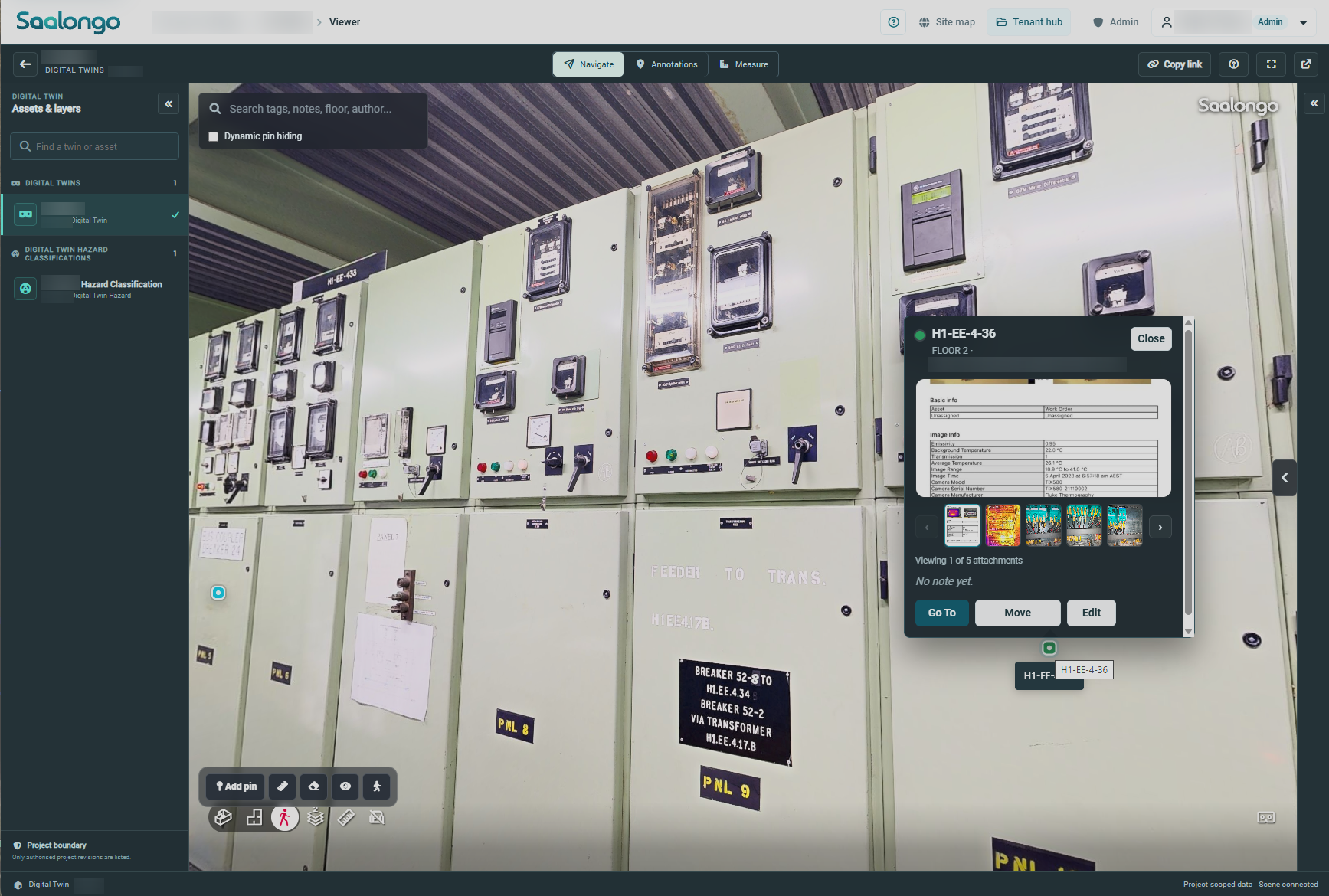
Actual Saalongo interface: documents and inspection images linked to equipment in 3D. Identifying details blurred. View full size.
INFORMATION PEOPLE CAN FIND
Move between the asset
and its information.
A useful project record needs both an organised document structure and a clear connection to the physical work. Saalongo brings folder-based information and spatial context into one platform.
Engineering documents
Bring drawings and supporting project information into the workspace.

Inspection evidence
Keep photographs, findings and related documents accessible for review.

Quality & handover records
Organise QC packs, test records and completion documents with the work they support.
STRUCTURE MEETS SPATIAL CONTEXT
Give the folder structure
a place in the plant.
01
Organise the project record
Use a folder structure that fits the project and its information.
02
Connect related information
Associate documents and evidence with the asset or work area.
03
Review with context
Move between the visual representation and the relevant record.
04
Keep information available
Retain the supporting documents for later project and asset reviews.
ACROSS THE ASSET WORKFLOW
Support the next task
with the right record.

Engineering review
Use drawings and site context together to understand the existing environment.
Inspection & maintenance
Connect the observed condition with the evidence and documents needed for assessment.
Construction & handover
Bring progress, quality and completion records into a coherent project record.
YOUR QUESTIONS
A little more context.
What types of information can the workflow include?
Typical information includes drawings, inspection reports, photographs, test records and QC packs. Confirm specific formats and viewing requirements in a demo.
Does this replace our existing document system?
The right approach depends on your document governance and project requirements. Discuss existing systems and any integration needs before deciding where each record should be managed.
Is this only a folder browser?
The folder structure helps organise information. Saalongo’s spatial context also helps users connect records with the asset and work they describe.
CONNECTED CAPABILITIES
Keep exploring.
Industrial Digital Twin Software
Explore industrial assets in their physical context. Combine captured reality and engineering information in a browser-based digital twin.

Construction QA/QC & Handover Software
Bring test results, inspection records and QC packs into the project context as work progresses, supporting a clearer path to handover.
Construction Progress & Punch List Software
Connect construction progress, punch items and completion evidence with the physical context of the work.
SEE IT WITH YOUR TEAM
Make it relevant
to your next project.
Tell us about your assets and the workflow you want to improve. We can focus the demonstration on that requirement.