
Home / Industrial Spatial Operations Platform
THE SAALONGO PLATFORM
Industrial spatial software.
One connected view.
Connect your industrial digital twin with inspection findings, construction progress, punch items, quality records and handover evidence in one spatial platform.
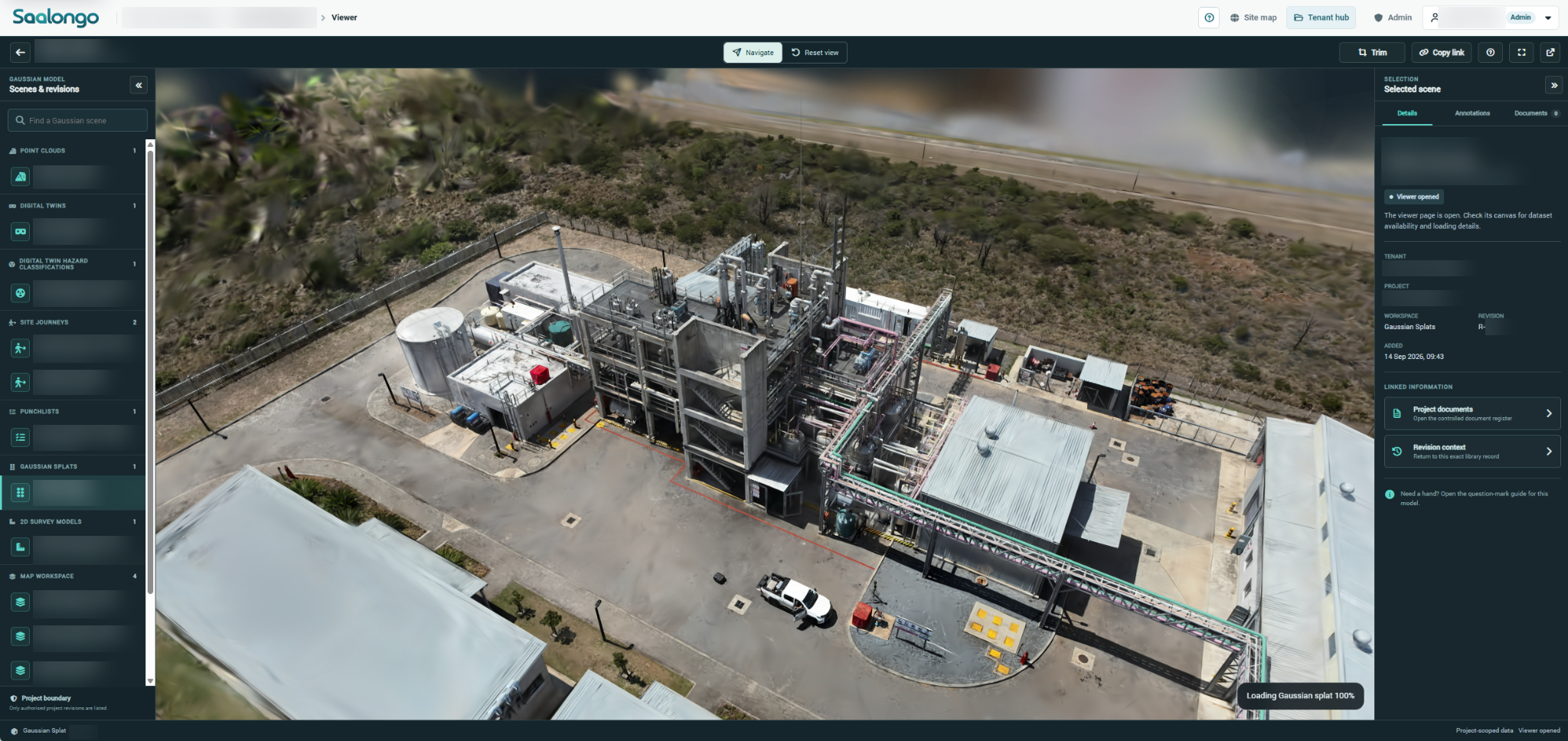
Actual Saalongo Gaussian splat viewer. Identifying details blurred. View full size.
ONE CONNECTED PROJECT
Move from the site
to the work that matters.
Engineering information is easier to use when people can see what it relates to. Saalongo connects visual site context with the records teams need to inspect, plan, review and hand over work.
See the asset
Explore captured reality through 3D models, point clouds, Gaussian splats and 360° imagery.
Understand the issue
Bring inspection findings, images and associated documents into the asset’s context.
Follow the work
Review construction progress, punch items and quality evidence as the project develops.
SAALONGO IN USE
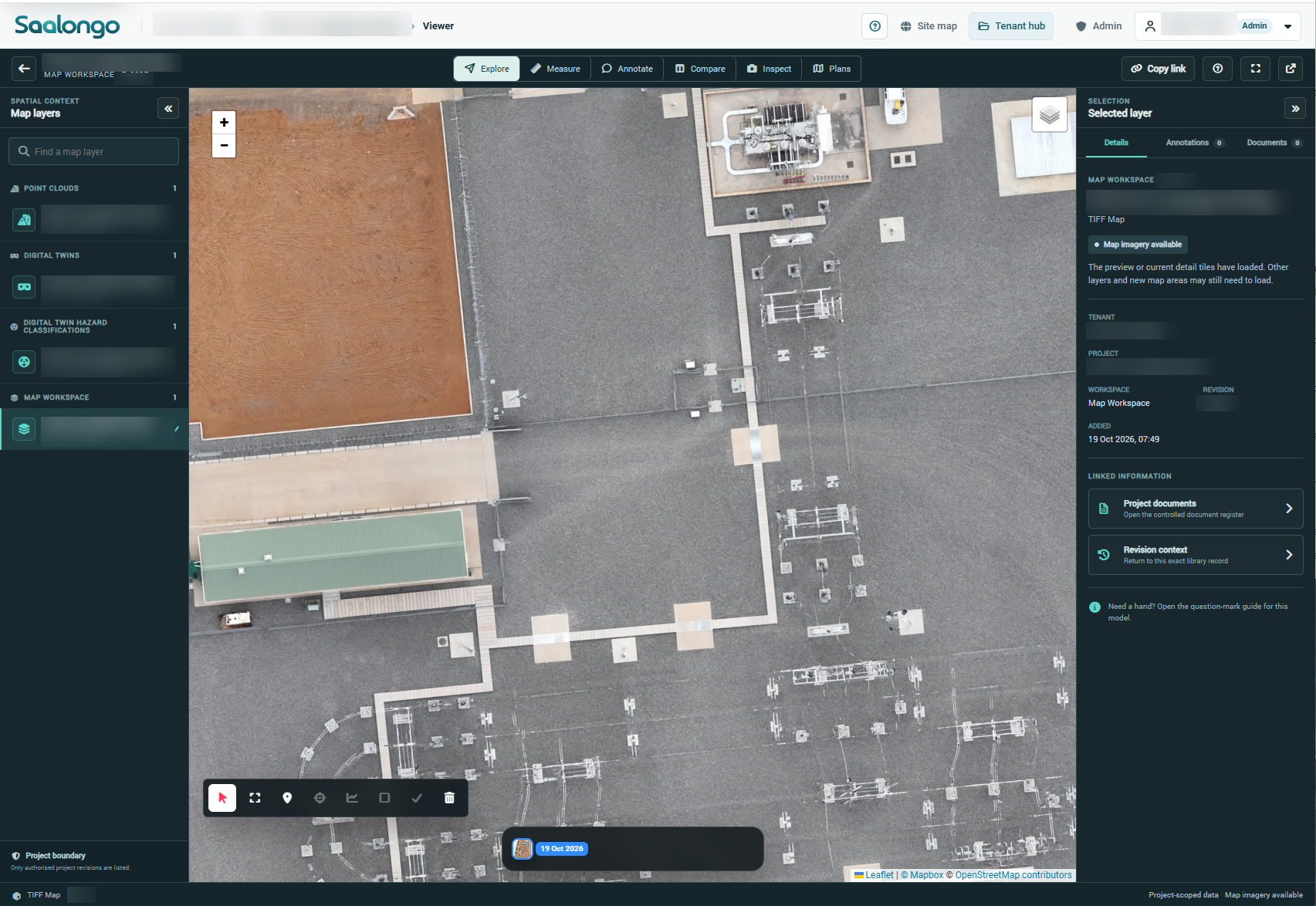
Bring every survey
into view.
Explore 2D mapping alongside the platform’s 3D views and connected project information.
FIVE CONNECTED CAPABILITIES
Explore the platform.
01
Industrial Digital Twin Software
Explore industrial assets in their physical context. Combine captured reality and engineering information in a browser-based digital twin.
02
Industrial Inspection Management Software
Connect inspection findings, visual evidence and asset context so your team can understand the condition and follow the work through close-out.
03
Construction Progress & Punch List Software
Connect construction progress, punch items and completion evidence with the physical context of the work.
04
Construction QA/QC & Handover Software
Bring test results, inspection records and QC packs into the project context as work progresses, supporting a clearer path to handover.
05
Asset & Engineering Document Management
Connect drawings, inspection evidence and project records with the industrial assets and work areas they describe.
FROM CAPTURE TO HANDOVER
Keep information useful
through the project.
01
Capture the physical context
Use existing scan data, appoint your own scanning provider, or use Proconics Advanced Solutions’ scanning services. Guidance on scanning operating instructions and workflows is available when required.
02
Organise the workspace
Arrange information by project and asset, with documents and evidence accessible from the relevant context.
03
Review and act
Use the visual record to discuss conditions, assess findings and follow project work.
04
Retain the evidence
Keep inspection, construction and quality information available for subsequent reviews and handover.
DESIGNED FOR INDUSTRIAL TEAMS
A shared view for
different responsibilities.

Engineers
Understand existing conditions and review asset information with the wider site in view.
Inspection & maintenance teams
Locate findings and supporting evidence within the asset or facility being reviewed.
Construction & asset owners
Connect progress, punch items and QA/QC records with the work they describe.
API & MATTERPORT
Connect your wider
software workflow.
Saalongo provides an API and integrates with Matterport, helping you connect the platform with the tools and captured site information your team uses.

API access
Use Saalongo’s API to support integrations with your wider software workflows. Share your requirements with the team to plan the connection.
Matterport integration
Use Saalongo’s Matterport integration as part of your spatial workflow. Explore the experience with your own Matterport content in a demonstration.
DEPLOYMENT OPTIONS
Choose where
Saalongo runs.
Choose the deployment model that fits your organisation’s hosting requirements.

Saalongo-hosted
Access the platform through hosting provided by Saalongo.
Microsoft Azure
Deploy Saalongo within a Microsoft Azure environment.
Amazon Web Services
Run Saalongo on Amazon Web Services (AWS).

Private hosting
Choose a privately hosted deployment of Saalongo.
On-premises
Install Saalongo within your organisation’s on-premises infrastructure.
YOUR QUESTIONS
A little more context.
Is Saalongo only a 3D viewer?
The spatial view is the starting point. Saalongo also brings inspections, construction progress, punch items, quality evidence and documents into the project context.
Do we need to capture the whole plant first?
A demonstration can focus on a defined work area or asset group. The appropriate capture scope depends on the decisions and workflows you want to support.
Can we use existing scan data or our own scanning provider?
Yes. Clients can use existing scan data and work with any scanning provider. Proconics Advanced Solutions also provides scanning services. The team can help review your data and advise on scanning operating instructions and workflows when required.
Does Saalongo have an API?
Yes. Saalongo provides an API for connecting the platform with your wider software workflows. Discuss your intended integration with the team.
Where can Saalongo be hosted?
Saalongo can be hosted by Saalongo, deployed to Microsoft Azure or AWS, privately hosted, or installed on-premises. Discuss your preferred option with the team.
CONNECTED CAPABILITIES
Keep exploring.
Industrial Digital Twin Software
Explore industrial assets in their physical context. Combine captured reality and engineering information in a browser-based digital twin.
Industrial Inspection Management Software
Connect inspection findings, visual evidence and asset context so your team can understand the condition and follow the work through close-out.
Construction Progress & Punch List Software
Connect construction progress, punch items and completion evidence with the physical context of the work.
SEE IT WITH YOUR TEAM
Make it relevant
to your next project.
Tell us about your assets and the workflow you want to improve. We can focus the demonstration on that requirement.